
Central publication and information platform
- X-MKP is a central publication and information platform that provides optimal support for setting up, running, managing and evaluating events on the Internet, intranet and extranet.
- X-MKP offers you expert support for abstract and participant management as well as for lecture, session and programme planning for the congress.
- X-MKP is based on a modular, integrative approach and successfully simplifies the management, online presentation and programme planning of congresses, scientific conferences, meetings, seminars, seminar series and associated trade fairs.
Support with publication, event organisation and data management
With the industry database system X-MKP, you can take three steps at once and increase efficiency in:
- publishing the event,
- organising and running an event,
- and preparing data for printing catalogues and conference proceedings.
The modules
The event management software X-MKP comprises software solutions for the following three areas:
- Congress management
- Abstract management
- Trade fair and exhibition management
The modules can be used individually or in combination with other modules.
They each include a standard layout that can be adapted to the event (images, colours, fonts, etc.).
Various areas/positions on the web pages are available for integrating advertising banners.

CONGRESS MANAGEMENT - General information
Online editorial system for planning and organising congresses and conferences
Conference management – General information about the event:
General information is first assigned to the overall event, which may consist of a conference and an associated trade fair, for example: information about the country, the city, travel and accommodation.
Congress organisation:
General information can then also be assigned to the congress as part of the event itself.
If necessary, an entire congress lasting several days can be divided into individual sub-congresses (divisions/topics), each of which comprises individual sections (sessions).
The time, venue and moderator are entered for each session. The sections are assigned the presentations with titles, speakers and further information. The speakers can be given access to the conference planning module themselves and thus enter their own texts (CV, picture, abstract of the presentations, etc.).
General information is first assigned to the overall event, which may consist of a conference and an associated trade fair, for example: information about the country, the city, travel and accommodation.
Congress organisation:
General information can then also be assigned to the congress as part of the event itself.
If necessary, an entire congress lasting several days can be divided into individual sub-congresses (divisions/topics), each of which comprises individual sections (sessions).
The time, venue and moderator are entered for each session. The sections are assigned the presentations with titles, speakers and further information. The speakers can be given access to the conference planning module themselves and thus enter their own texts (CV, picture, abstract of the presentations, etc.).
Lists/web pages automatically generated from the content entered:
- Room allocation plan (when each room is occupied),
- Daily programme (when and where each session takes place),
- Lists of speakers' presentations sorted by keyword,
- Control mechanism for abstracts already entered,
- Export of all abstracts for the conference proceedings to be printed,
- List of participants for the conference / workshop.
Visitor-defined lists:
Visitors and participants at a conference or trade fair can compile and print out individual overview lists of presentations
at a conference and/or companies exhibiting at a trade fair.
Speakers can access the conference planning module themselves and enter their own texts (CV, photo, abstract of presentations,
etc.).
>> more about ORGANISATION OF THE EVENT
X-MKP provides you with numerous functions that enable you to manage your event efficiently and easily.
In addition to entering general data and information about the event itself, the congress module offers all the tools you need to help you realise your event.
Administration:
In addition to entering general data and information about the event itself, the congress module offers all the tools you need to help you realise your event.
Administration:
- Creation and management of speakers
- Creation and management of rooms
- Session management: creation and management of topics and sessions
- Scheduling of sessions and room allocation (with capacity information) and selection of moderators from created speakers
- Dynamic assignment of presentations to a session and simultaneous creation of a presentation schedule based on freely definable time slots
- Creation and management of plenary sessions
- Creation and management of presentations
- Export of programme and speaker lists (CSV or XML)
- Direct import of speakers (CSV)
- Preparation of data for printing catalogues and conference proceedings
- Downloading papers for conference proceedings creation
- Abstract handling (abstract submission, peer review, paper selection)
- Entering additional information via the integrated editorial system
Congress website:
All stored and approved data and information is used to automatically generate a website whose layout can be adapted to your corporate identity. This allows you to create a complete event website without having to resort to other programmes or agencies.
Website output for the conference area:
Speaker editorial team:
Each speaker receives access data to a special speaker editorial office, where they can independently maintain their personal and company data as well as information about their presentation and upload their paper.
The editorial deadline for this administration can be set individually or collectively.
All stored and approved data and information is used to automatically generate a website whose layout can be adapted to your corporate identity. This allows you to create a complete event website without having to resort to other programmes or agencies.
Website output for the conference area:
- Topics/sessions overviews with detailed pages
- Programme
- List of speakers with information page for each speaker
- List of presentations with information page for each presentation
- Search
- Congress planner
- Speaker login
- Additional information about the congress, the organiser, contact forms, etc.
Speaker editorial team:
Each speaker receives access data to a special speaker editorial office, where they can independently maintain their personal and company data as well as information about their presentation and upload their paper.
The editorial deadline for this administration can be set individually or collectively.
>> more about SESSION PLANNING
X-MKP supports you in
- organising and running a congress, conference and/or trade fair event,
- publishing the event on the intranet/internet/extranet,
- Preparing data for printing catalogues and conference proceedings,
- Online editorial and information system for congress and trade fair events,
- Significant reduction in the workload involved in setting up and planning a congress, conference or trade fair and streamlining of work processes,
- Enables decentralised content entry via standard browsers over any IP network (DSL, ISDN, modem),
- Complete capture of all content in databases,
- Media-neutral storage of content in XML data structures,
- Dynamic generation and provision of up-to-date conference and trade fair information with detailed schedules
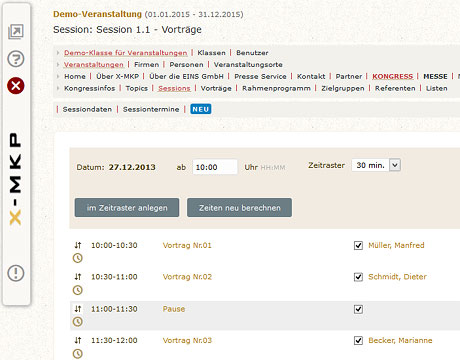
- Up-to-date, web-based conference programme with online full-text search engine (contributions, authors, programme, participants, etc.),
- Personal online conference planner,
- Daily updated, web-based exhibitor directory and hall occupancy plan,
- Online submission of conference contributions and information about the authors (CV, etc.),
- Enables the timely publication of conference content,
- Easy compliance with company CI/exhibition CI/trade fair CI (corporate identity),
- Allows the input and ongoing maintenance of conference websites without programming knowledge,
- Allows the timing control and monitoring of menu entries and content,
- Web server for conference websites with permanent storage,
- Statistical information,
- General information about the conference, the venue, travel, accommodation,
- More efficient acquisition, processing, publication and distribution of conference information,
- Automatic trade fair and event calendar,
- Lower costs for print/CD production and information distribution,
- ‘Call for Abstracts’ option for handling abstracts for scientific conferences,
- WEB POLL / web survey,
- Management of ‘free’ places in a section / workshop,
- Integration into existing websites possible.
TRADE FAIR AND EXHIBITION MANAGEMENT:
Online editorial system for planning and organising conferences, etc., including press service for exhibitors / import
of exhibitor data
X-MKP provides you with numerous functions that enable you to manage your event efficiently and easily.
In addition to entering general data and information about the event itself, the trade fair/exhibition module offers all the tools you need to help you realise your event.
Administration
In addition to entering general data and information about the event itself, the trade fair/exhibition module offers all the tools you need to help you realise your event.
Administration
- Creation and management of exhibition halls and locations
- Exhibitor registration: creation and management of exhibitors and contact persons
- Creation and management of stands
- Management of exhibitors' press mailboxes
- Export of exhibitor and hall lists (CSV or XML)
- Direct import of exhibitors (CSV)
- Creation of a dynamic hall plan (a so-called image map that displays information about the respective exhibitor when the mouse is moved over the stand symbols and links to their information page)
- Entry of additional information via the integrated content management system
Website output trade fair area
All stored and approved data and information is used to automatically generate a website whose layout can be adapted to your CI/corporate identity.
This allows you to create a complete event website without having to resort to other programmes or agencies.
Exhibitor editorial team
Each exhibitor receives access data to a special exhibitor editorial office, where they can independently maintain their personal and company data as well as information about their stand. In addition, they can manage their press mailbox here (if approved).
The editorial deadline for this administration can be set individually or collectively.
All stored and approved data and information is used to automatically generate a website whose layout can be adapted to your CI/corporate identity.
This allows you to create a complete event website without having to resort to other programmes or agencies.
- Exhibitor list with information page for each exhibitor
- Search
- Trade fair planner
- Exhibitor login
- Additional information about the trade fair, the organiser, contact forms, etc.
Exhibitor editorial team
Each exhibitor receives access data to a special exhibitor editorial office, where they can independently maintain their personal and company data as well as information about their stand. In addition, they can manage their press mailbox here (if approved).
The editorial deadline for this administration can be set individually or collectively.
>> more about TRADE FAIR AND EXHIBITION MANAGEMENT
- Includes X-MKP standard layout and CSS customisation (colours, fonts, etc.)
- Data export of exhibitors for the conference proceedings
- Press mailboxes for trade fair exhibitors
- Import of exhibitor data
- Newsletter
- Trade fair website in up to 3 languages
- Trade fair website for mobile devices
- Integration of multimedia files: podcasts, videocasts
- Dynamically generated hall plan
- Separate administration for exhibitors
- Event calendar (for integration into other websites)
>> more about INTERACTIVE HALL PLAN
A dynamic hall plan (known as an image map) can be generated from a hall plan image in the administration environment. This
serves as a graphical ‘link directory’ (interactive hall plan) and displays information about the respective exhibitor when
the mouse is moved over the stand symbols.
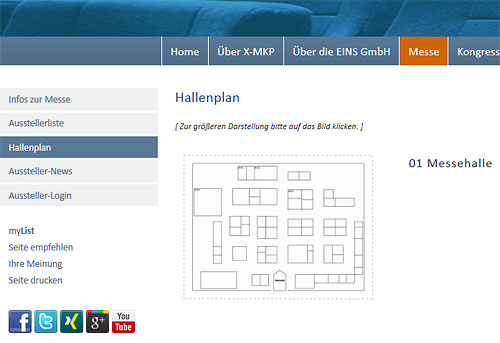
About the administration of dynamically generated hall plans (area: trade fair/hall plan)
This is done in the administration by simply assigning the stands to the corresponding areas you have marked.
A digitised hall plan serves as a template on which the stands can be drawn in the administration section, so to speak.
A digitised hall plan serves as a template on which the stands can be drawn in the administration section, so to speak.
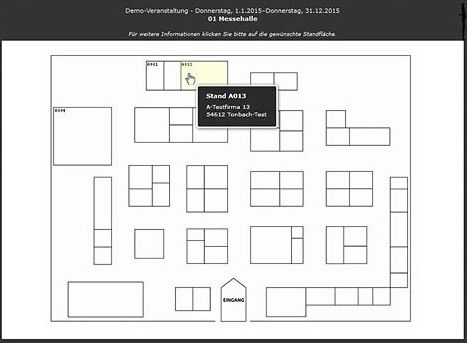
Enlarged view of the hall plan (area: trade fair) with interactive display of an exhibitor
CALL FOR ABSTRACTS / ABSTRACT-MANAGEMENT
Modules for handling the submission and judging of abstracts/papers for scientific conferences
The Abstract Management module supports the submission and review of conference presentations based
on a brief description:
- Call for Abstracts (CfA) / Call for Papers
- Abstract handling
- Abstract management
It supports the entire process of submitting, evaluating and publishing scientific conference contributions, right through
to planning and presenting the scientific programme on the Internet.
This module can be conveniently activated and controlled in the event administration section of X-MKP.
In addition, general settings for the interface can be stored for submitters, such as the name and e-mail address of the contact
person, comments or download documents.
With this module, we offer you online submission and review with personalised access for both submitters and reviewers.
It allows you to conveniently submit contributions for events or journals online and have them evaluated by reviewers.
>> more about ABSTRACT MANAGEMENT
If the conference module is also used, all sessions and speakers can be automatically transferred to the conference:
- A tool for managing abstracts (author contributions) for scientific events or journals
- Support for processes ranging from simple submission, including participant registration, to electronic, web-based reviewing, to data export of speakers and contributions for the conference proceedings
- Notification to submitters regarding acceptance or rejection
- Easy online submission of contributions by authors (format: tex, pdf, text)
- Post-processing option for authors
- Assignment to the respective sections (sessions) of a conference
- Bilingual websites (de/en)
- Optional: automatic transfer of accepted contributions to the congress/conference website (Congress module)
With Abstract Management, we offer you high quality assurance, planning reliability, and extensive control options
for the entire management of abstracts:
- Online participant registration
- Electronic (online) reviewing
- Data export, e.g., for print publications or for import into other program
- Assignment of the conference by sessions
- Trilingual websites
- Post-processing option for authors
- Preparation of presentations as print templates, book or CD production
- Optional: Link to conference website and automatic transfer of accepted contributions to the congress or conference website (System X-MKP).
What is a call for papers/participation?
A call for papers or call for participation (CFP for short) is a method used to solicit academic papers or other contributions on a specific topic. The call for papers usually takes place in the run-up to an academic conference or the publication of an academic journal. As a rule, applicants register and then submit their abstract (a summary of their presentation and/or conference paper). These are then evaluated by an academic committee (the reviewers). All abstracts that receive a positive evaluation are invited for publication. The CfP contains information about the topic of the papers to be submitted, their type and scope, who they should be sent to, what summary should be provided, and when they should be submitted by. (Source: www.wikipedia.de, among others).
A call for papers or call for participation (CFP for short) is a method used to solicit academic papers or other contributions on a specific topic. The call for papers usually takes place in the run-up to an academic conference or the publication of an academic journal. As a rule, applicants register and then submit their abstract (a summary of their presentation and/or conference paper). These are then evaluated by an academic committee (the reviewers). All abstracts that receive a positive evaluation are invited for publication. The CfP contains information about the topic of the papers to be submitted, their type and scope, who they should be sent to, what summary should be provided, and when they should be submitted by. (Source: www.wikipedia.de, among others).
>> more about REGISTRATION AND SUBMISSION
The submission form (registration/upload of abstract) can be embedded in the X-MKP Congress website or easily
integrated into your own (existing) website.
- Any internet user can register for the call for abstracts process.
- Once confirmed, additional information can be added and managed in addition to the address details.
- Abstracts can be uploaded in any digital format, such as PDF, PowerPoint or Word.
- After entering their personal details, applicants/submitters can upload their abstracts to the system. To do this, they must select a suitable section from the sections created for the conference. In addition, they can indicate whether they would prefer a poster session for their presentation. The number of uploads is limited to 10 by default.
- The following evaluations are planned: accepted (acc), rejected (rej), still open (pend).

Management of uploaded abstracts:
- All submitted and uploaded abstracts for a section are listed and can therefore be selected and downloaded.
- It is also possible to note whether the presentation has been invited (inv) and whether it is to take place as part of a poster session (post). By clicking on the name of the submitter (‘Author’), it is possible to contact them, e.g. by email.
- Different masks are displayed for the manager and the reviewer. A manager can see all abstracts, evaluate them himself, assign them to a reviewer or move them to another section.
- A reviewer only sees the abstracts assigned to them and the corresponding evaluation fields. By clicking on the name of the submitter, the reviewer can contact them.
- All accepted abstracts/applicants can be transferred to the created conference (if X-MKP is used) at the touch of a button. If necessary, the planning can also be changed here, and accepted abstracts/applicants can be subsequently assigned to other sections.
Publication:
When using X-MKP, all submitted abstracts/papers can be automatically transferred to the conference proceedings.
Reviewers:
Reviewers can only be created by a user who has previously been registered in X-MKP as an administrator or event manager.
These are divided into two groups:
- Managers for sub-conferences (division managers) and
- Reviewers
SAAS (Software as a Service) / HOSTING
Option to hire the X-MKP exhibition and conference planning system or individual modules
- EINS Software Solutions UG offers smaller conferences and events the option of monthly rental of the X-MKP trade fair and conference planning system or the X-AbstractManagement module.
- It is also possible to rent the entire system or individual modules per event (e.g. for 6 months: 4 months before the conference begins, 2 months after the conference ends). Here, too, the navigation, structure and content are entered by the conference organiser themselves and the layout is adapted to their own or the conference layout.
With hosting, you can choose between
- installation on one of our servers in our data centre (a dedicated virtual server is also possible), so that you do not need any hardware, or
- installation on your server (Linux platform).
Technical specifications
Technical specifications:
- Clients / Browsers
- Database systems: PostgreSQL (others via JDBC/ODBC)
- Web server: Apache
- Application server: Tomcat
- Operating systems: Linux
Clients / Browsers:
Decentralised content capture, editing and opening is performed via standard browsers on any IP network:
Decentralised content capture, editing and opening is performed via standard browsers on any IP network:
- Netscape Navigator version 4.5 or higher, Internet Explorer version 4.01 or higher
- Firefox version 3 or higher, Safari, Opera
- Editing pages: Internet Explorer version 7 or higher on Windows PC